Bending Guidelines
Use these guidelines to design sheet metal parts that quote cleanly and bend without surprises. The checks that matter most are bend angle, material thickness, flange length, reverse bend clearance, and feature placement near bends.
File Checklist
Before you upload a bent sheet metal part, run through this list:
- Export the part as a 3D STEP file
- Confirm the material and thickness are in our bending range
- Confirm each bend angle is within our capability range
- Check minimum flange lengths
- Check reverse bends, return flanges, channels, joggles, and box shapes for punch clearance
- Keep critical features outside the distortion zone
If you have questions about our process, use the chat bubble or email support@fabworks.com.
Bending Capabilities
Our press brake bends most common sheet metal materials up to 0.250" thick. Parts that follow these guidelines get the fastest lead times and the cleanest results. If a part falls outside them, our quoting engine flags it before you order.
Material Range
- Thicknesses: 0.030" to 0.250"
- Materials: Aluminum 5052-H32, Steel 1008, Steel A36, Stainless Steel 304-2B, Galvanized Steel G90
- Maximum bend length: see the material table below
For thickness and bend length combinations by material, see the materials pages.
Bend Angle
The maximum bend angle depends on the material, thickness, and tooling used for the part. Use the material table at the bottom of this page to confirm the limit for the stock you plan to use.
If your part has a return flange, channel, joggle, or box shape, also check the reverse bend clearance section below. Tooling clearance can limit a part even when the bend angle itself is within range.
Minimum Flange Lengths
The minimum flange length is the shortest straight run of material allowed between a bend and the edge of the sheet. Anything shorter can slip into the V-die or buckle during bending, which ruins the part.
The minimum depends on the V-die and the bend angle. Material and thickness can change which V-die we use, but for the same die and angle, thickness alone does not change the minimum. The calculator below estimates the value for your part.
How to Measure Flange Length
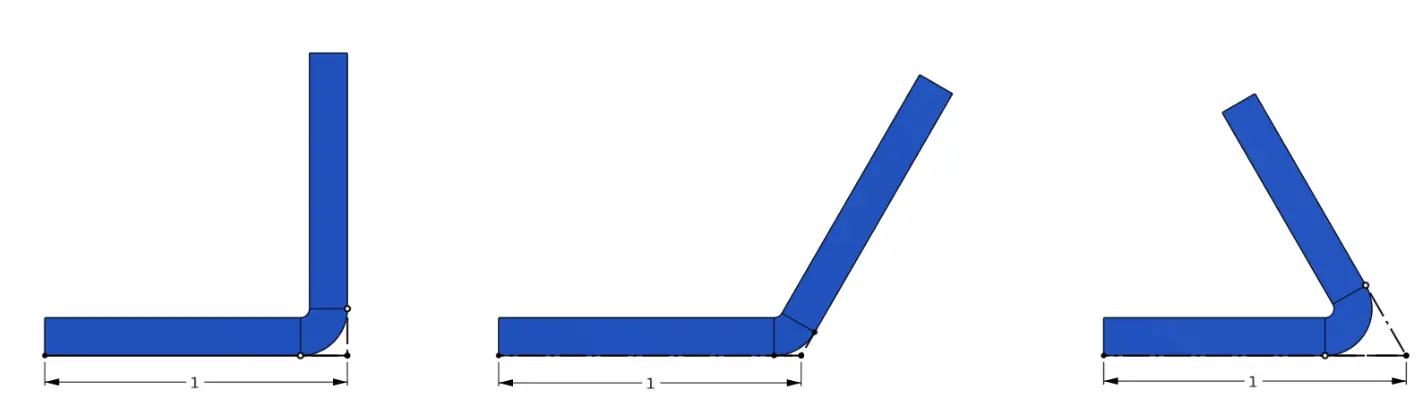
Measure flange length to the apex of the bend, not along the finished flat face. At the same flange length, a sharper bend leaves less flat surface.
Flange Length Calculator
Select the material, thickness, and bend angle. The green dimension is the minimum flange length. The orange dimension and hatched area mark the approximate distortion zone.
Minimum flange calculator
See where the short flange must reach to stay supported during bending.
Want us to check the whole part? Upload your STEP file. Our software checks every flange against the minimum length and flags critical features inside the distortion zone.
Minimum Joggle Spacing
A joggle uses two close, opposite bends to offset one face of the sheet from the other. As the second bend forms, the first bend has to clear the lower die through the full stroke. If the bend lines sit too close together, the sheet hits the side of the die before the joggle is finished. Specialized joggle tooling can make tighter offsets, but we form every joggle with our standard press brake tooling.
Select a material and thickness, then use the 1 × t or 2 × t shortcuts for common joggle offsets. The calculator shows the bend angle needed to reach that offset while still meeting our minimum flange length.
Minimum joggle calculator
Find the tightest joggle for your material, thickness, and finished angle.
Reverse Bends
A reverse bend is any bend where the punch has to reach into a channel formed by an earlier bend. Z-bends, joggles, U-channels, return flanges, and boxes all qualify. For these features, punch clearance sets the limit. The press brake simulation on your quote checks every bend order against our tooling and shows where a flange hits the punch.
Reverse Bend Clearance Checker
Use the checker below when your part has a return flange or box feature. The colored curves show the clearance envelopes for the punch styles our quoting engine can select.
Reverse Bend Clearance Checker
Compare return flanges and box bends against available press-brake punch clearance.
Values show punch, upper-tool extension, and machine-frame contact thresholds for the selected angles with both extensions installed. Leave about 0.05" below the curve for a conservative production margin.
Box Depth Clearance Calculator
A four-sided box also has to clear the machine while its last two sides are formed. Select the material and thickness, then enter the finished outside length, width, and depth. The calculator checks both bend orders, with the length sides or the width sides formed last. It shows whether the sides formed first will clear. For boxes with holes, tabs, or uneven sides, the press brake simulation on your quote checks the actual part. If the box corners will be welded, set them up following the welding guidelines and the welding design guide.
Box Depth Clearance Checker (Beta)
Compare the last two bends of a four-sided box against available press-brake clearance.
Length sides last. The box clears during bending.
Width sides last. The box clears during bending.
Bend Radius
We air bend, so the finished radius of a bend does not match the punch radius. The sheet forms its own curve across the die opening, which means the finished inside and outside radii depend on material and thickness as well as tooling. We measure a 90° test bend for every material, thickness, and die, and the calculator shows the radius that test bend implies. Past 90° the radius tightens slightly as the sheet wraps the punch. On shallower bends it opens up, up to three times the 90° radius.
You don't need to model a different radius for every bend. Any radius from the punch radius up to the finished radius works: we keep your flanges where you modeled them, and the radius only changes the shape at the corner. We flag a bend only when its radius is far enough outside that range to visibly move the outside corner.
Select the material, thickness, and finished angle to see the finished inside (ID) and outside (OD) radius on our tooling.
Bend radius calculator
Finished inside and outside radius for your material and thickness, from the 90° test bend we measured on our production tooling.
Tolerances
- Single bends are held to a +/- 0.015" length tolerance
- Single bends are held to a +/- 1 degree angle tolerance
- Features separated by multiple bends have an additional +/- 0.015" tolerance for each separating bend
- Die marks will be visible on all bends
K-Factor
The K-factor sets where the neutral axis sits inside a bend, which determines how much material each bend consumes when the part is unfolded into a flat pattern.
You do not need to calibrate a K-factor for us. Upload the finished 3D STEP model and we generate the flat pattern from that geometry, using the bend radius and K-factor for our own tooling and process. Model the part to its finished bent dimensions. Your CAD K-factor only affects flat patterns you generate yourself and does not need to match ours.
What We Can't Bend
- Bends longer than the maximum length listed for that material in the table below
- Bends past the maximum angle listed for that material and thickness
- Reverse bends that exceed the available punch clearance envelope
- Materials not in our standard inventory
Not sure if your part is bendable? Upload your STEP file and our software checks it in seconds, then simulates every bend on our press brake.
Material Table
This table lists stock thickness, the finished inside radius from our 90° test bends (at 90° and, under Columns, 135°), minimum flange length, maximum bend length, and maximum bend angle for each material. Use the Columns menu to show the nominal tooling radius and the K-factor that goes with the finished radius. Together, that radius and K-factor reproduce our measured bend deduction at 90°.
| Material | Thickness | Max Bend Length | Max Angle | Min Flange Length 90° | Distortion Zone 90° | Inside Radius 90° |
|---|---|---|---|---|---|---|
| No data | ||||||
Tube
Tolerances, stock sizes, features, and other guidelines that are important to know when designing parts for our tube laser cutting service.
Hardware
Hardware insertion is the process of installing PEM nuts, studs, standoffs, and other fasteners into sheet metal parts. These components are essential for the assembly of sheet metal parts and are often used to attach other components like PCBs, panels, and other sheet metal parts.